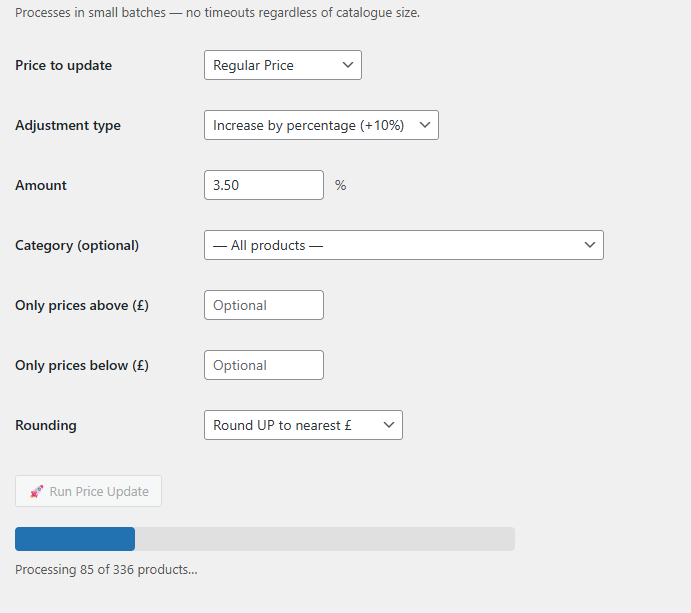
Instantly update WooCommerce product prices across your entire catalogue or by category — no more editing products one by one. Processes in silent background batches so it never times out, no matter how large your store.
Vulture Bulk Price Update makes it simple to adjust product pricing across your entire WooCommerce store in just a few clicks — no more editing products one by one.
Whether you need to raise prices across the board, run a category-specific discount, or set everything below a certain price to a fixed amount, this plugin gives you full control. Choose to increase or decrease by a fixed £ amount or percentage, or set an exact price — then filter by category, minimum price, maximum price, or any combination of the three.
A built-in rounding option lets you snap final prices to the nearest pound (up, down, or nearest) for clean, professional-looking pricing.
Built for real-world stores, it handles both simple products and variable products with all their variations. Processing runs in small background batches with a live progress bar, so it never times out — no matter how large your catalogue is.
A focused toolkit for WooCommerce store owners who need to move fast on pricing.
Increase or decrease by a fixed £ amount or percentage. Set an exact price across everything. Six adjustment modes to cover any pricing scenario.
Target a specific category or update your entire catalogue at once. Combine with min and max price filters to target exactly the right products.
Processes in small AJAX batches with a live progress bar. Works on stores with thousands of products without hitting PHP timeout limits on any server.
Fully handles variable products and all their variations — size, colour, and every combination. Not just parent products like the default WooCommerce editor.
After adjusting, snap prices to the nearest whole pound — up, down, or mathematically nearest. No more £12.37 sitting in your catalogue.
Domain-locked licence key system means your purchase is tied to your site. Instant activation, one-click deactivation if you need to move domains.
No configuration files, no developer needed. Just install, activate, and go.
Pick the plan that suits your store below. You'll receive a licence key by email — a unique code tied to your domain that unlocks the plugin.
Download the zip file and upload it via WordPress → Plugins → Add New → Upload. Activate it like any other plugin — takes about 30 seconds.
Go to WooCommerce → BPU Licence in your WordPress admin, enter your key, and hit Activate. The plugin verifies your domain and you're good to go.
Head to WooCommerce → Bulk Price Update. Choose your adjustment, set any filters, hit Run — and watch the progress bar do the work. That's it.
One-off licence fees per site. No subscriptions, no surprises.
Contact us to purchase a licence or ask any questions. We'll get back to you same day.